crv-left crv-right-top


"The future of trading is the worldwide 24 hour* high liquidity market known as the spot Forex." - ForexEarlyWarning


The Forex Heatmap is only at ForexEarlyWarning
Free 30 Days Trial
How to get FEW for FREE every month!
DVD Training Course
Broker Rebates
 

The Forex Heatmap (tm) Tutorial


The Forex Heatmap (tm) Tutorial


Overview

 
The Forex Heatmap ™ is a trade entry management tool that graphically displays pockets of strength and weakness in individual currency groups on the forex market and verifies your trade entries. It also points you towards supplemental trades and movements that may not have been considered in the trade planning process or due to unexpected news or market sentiment. The Forex Heatmap ™ also assesses the risk of each entry. THis tutorial covers Version 2.0 and 3.0.   


Features

 
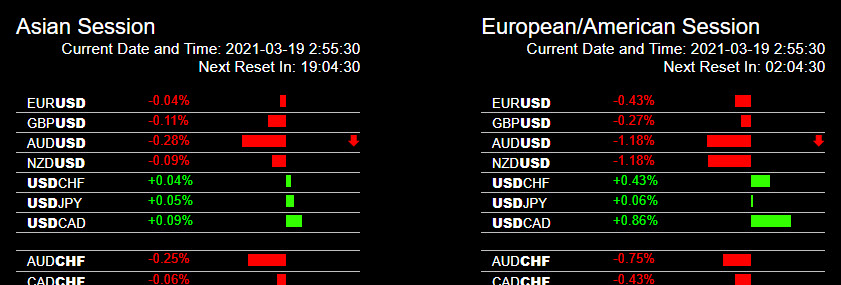
There are two separate heatmaps, the one on the left for the Asian session resets to zero at 2200 GMT just ahead of the Sydney open. The one on the right for the main trading session resets to zero at 0500 GMT and is for trading in the main session or combined European/American session.     


The current GMT time is listed at the top of each of the two heatmaps. And the amount of time until the next reset to zero is also on top of each map.        


After you login as a member of Forexearlywarning go to the blue "members area" to access the heatmap and heatmap dashboard. The Forex Heatmap ™ version 2.0 automatically refreshes every 30 seconds, and version 3.0 updates somewhat faster.  


How to Use The Heatmap With Your Trading


Prior to using the Forex Heatmap ™ you should review all of the learning resources including this tutorial. These resources include:           


The Forex Heatmap Educational Blog    


The Step By Step Guide to Using The Forex Heatmap --Located on The Blog    


Image Library of Entry Signals on Flickr -- Also On The Blog and Heatmap Page on Forexearlywarning.com        


Lesson 14, 15 and 22 --- All related to The Forex Heatmap from our 35 lesson training package  ---- Also On The Blog and accessible from the homepage, bottom links. 

  
Links to all of these resources can be found on the Forexearlywarning.com homepage on the upper left of the homepage by clicking on the "The Forex Heatmap is Here" banner and at various other places on the Forexearlywarning website. Review these resources several times and bookmark them before placing your first papertrade. Contact Forexearlywarning with any specific questions.


The Forex Heatmap ™ is best used after the start of the London session and through the US sessions. Read Lesson 14 a few times on the resource list above to make sure you understand this concept. After significant news on the news calendar or when your Forexearlywarning Second Opinion trading plan price alarms go off check the configurations on the heatmap to make sure your entry is validated, on pairs within the same parallel or inverse group. For example if the alarm goes off on the EUR/JPY you would buy it if the EUR is strong or the JPY weak or preferably both. Once again review all of the resources listed above for more details.


Once the market has decided where it wants to go the configurations on the heatmap may not change for several hours and possibly for up to 15 hours as the sentiment of the market and currency strength and or weakness drives the pair you are trading higher or lower. Each entry generally requires not more than about four or five inspections of the heatmap, making this tool is an incredible time saver. Remember it doesn’t make a lot of sense to stare at the heatmap all day, this defeats the purpose of having it. Always have your trading plans handy, set your price alarms as specified in the Second Opinion trading plans, and watch for all of the strong news drivers on the market on the news calendars we specify.   


As with any new tool it takes some time to get used to. Papertrading and microlot trading with stops is expected for all new users to get used to our system, the heatmap, support and resistance, and trend indicators, etc.          


On Sunday night the spot forex opens ahead of most forex brokers platforms. This creates a price gap at the opening of trading on most trading platforms.  The Forex Heatmap ™ will reflect this price gap and it could interfere with trading on Sunday night. If price gaps are small the Forex Heatmap is still usable on Sunday night, if the price gaps are large wait until the European session. Lesson 14 covers the best times to trade the forex.    


Percentages    


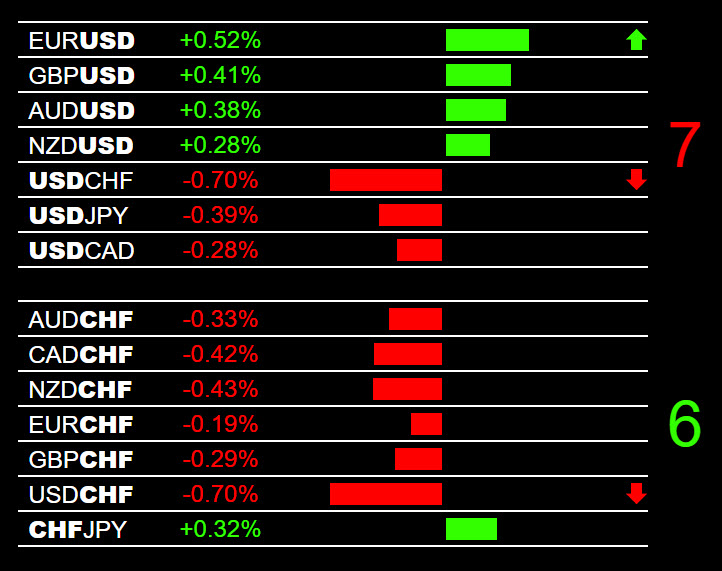
When checking the percentages you are generally looking for all of the percentages on one individually currency group to be greater than 0.25-0.30 % before considering taking a trade.  When the forex market is quiet, the pricing and percentage of movement on the red and green bars tends to bounce around in a small range and these movements don’t mean too much if all of the percentages are lower than the 0.25-0.30% threshold. Movement less than this is not meaningful. It takes some getting used to. 
 

After most of the news items and the forex market momentum starts to hit in the main trading session, or after significant price alarm points in the Second Opinion trading plans are breached, like after a strong news driver, then the configurations and percentages become very meaningful and can map out the market momentum clearly.  When all of the percentages within one currency group exceed plus or minus 0.25 - 0.30% then you can start to watch those pairs for an entry in the main session.           


For example if all of the JPY pairs are green on the heatmap and all of the percentages are 0.25-0.30% and look consistent the JPY is clearly weakening. If the AUD is strong you would see green bars on the pairs with the AUD on the left and red bars on a pair like the EUR/AUD, but once again all pairs would be consistently at 0.25-0.30%. The EUR/AUD would be minus 0.25-0.30% for AUD strength and the pairs with the AUD on the left like the AUD/USD or AUD/JPY would be plus 0.25-0.30% for AUD strength. Once again this takes some getting used to but the logic is simple. 


Also on version 3.0 there is an arrow system that points you to the market leaders that are trading above or below the 0.25% threshold so you should check the configurations and percentages on these pairs first. If there are no arrows there are likely no trades for that session. 


Using The Heatmap with The Forexearlywarning.com System 


The Forex Heatmap (tm) is synergystic, if you add other components of the Forexearlywarning trading system to the heatmap your trade results get better quickly. Movements after stable consolidations, trading fresh movements, selling a pair with little or no support, etc. all add to the stability of any entry.      


Trends and The Forex Heatmap ™    


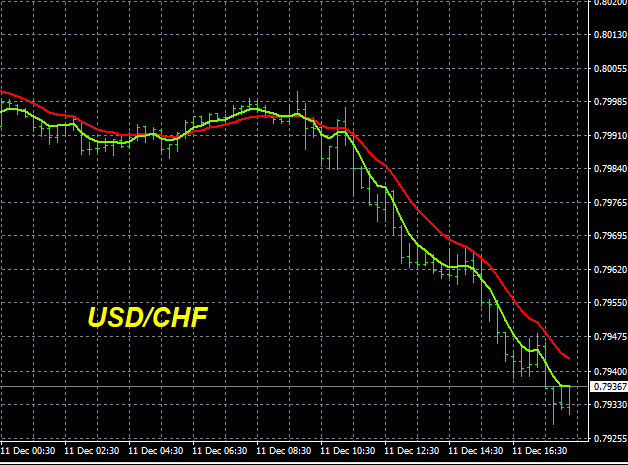
The Forex Heatmap ™ configurations will occasionally suggest a buy or sell signal that is against the major trend on a particular pair. Sometimes currency pairs move against the trend after extended moves or after unexpected news and it is the job of the heatmap end user to know the direction of the primary trend. Knowing the direction of the trend of a pair is not difficult and you can use the free trend indicators provided on the Forexearlywarning  homepage as well as the Second Opinion reports which are trend based trading plans. 


If you are an experienced trader and you trade against the trend and you understand the risk and reward of doing this extra pips are possible but you would be trading more frequently. At Forexearlywarning we always trade with the trends of the forex market but we fully understand that short term movements can and will occur against the trend.   


When you check the heatmap always check the trend indicators, when you have a fresh crossover on a D1, H4, and and sometimes even an H1 timeframe after a stable consolidation generally the trade is going to be a winner. Become a good student of multiple time frame analysis and the heatmap becomes a powerful weapon.   


Support and Resistance and The Forex Heatmap ™ 


The Second Opinion trading plans outline price alarm points and targets where they can be determined across 28 currency pairs. If the heatmap indicates an entry on a pair and there is no near term support or resistance entry success rate and pip return goes up substantially. However if the heatmap indicates a buy or sell entry on a pair stuck in layers or clusters of support or resistance then the pair struggles with its movements. So always look for pairs with no near term support or resistance nearby or take the day off trading. A new movement or opportunity will likely come your way the very next day anyway.    


When to Use The Forex Heatmap ™


Lesson 14, "Best Times To Trade The Spot Forex"  is from our 35 lesson package on The Forex Heatmap Educational Blog. This lesson thoroughly reviews the trading sessions and best times to enter trades.      


The Forex Heatmap ™ is primarily to be used in the European and American session for 90% of your entries, this is when sustainable entries occur. However it is possible to use in the Asian session with some limitations and after you have about 1 year of real money trading experience. One year of experience watching the JPY, NZD, and AUD pairs and Asian session news items within the context of the trend will start to produce additional pips in the Asian session , especially when these movements are brand new movements on the larger timeframes.    


Technical and Computer Information 


The Forex Heatmap version 2.0 has had 99% uptime and runs on most browsers without a problem. If the heatmap is malfunctioning on your computer try to follow these steps:  


Shut down and restart your computer.  Check the heatmap on other browsers like chrome, internet explorer, or firefox.  If it is not working at all you can email Forexearlywarning but all we can tell you is whether or not it is working on our end we do not provide computer troubleshooting assistance for $19.95 per month please seek qualified computer expertise. 


Initially, you should try to use the heatmap with several web browsers , i.e., internet explorer, firefox, etc to see what browser works best for you.  Different browsers have different types of settings and controls which allow screen resizing, magnifying, customization, etc.  Different browsers can serve the different needs of each end user. End users can have different computer screen sizes and more than one screen for trading.      
 

If one of the heatmap stops working for any reason it is not necessary to contact Forexearlywarning, we will be posting notes on the Forex Heatmap dashboard daily in the "Status Notes" area for version 2.0 and 3.0 to keep you informed of outages, server maintenance, or known issues. Having two heatmaps acts as a fully redundant backup systems and if one heatmap if offline just use the other one.    


Advantages to Using The Forex Heatmap ™


You can check The Forex Heatmap ™ from any computer, its portable.  


No downloads are necessary, just login and check the condition of the forex market.


It is on all of the time during the trading week.


It can be used after major news items like interest rate announcements and nonfarm payrolls.

 
It works on web enabled devices like smartphones.


It locates trades on 28 pairs.     


The heatmap teaches you about the forex and why currency pairs move makes you a better trader.


It locates “supplemental trades” that may not be identified in the Second Opinion trading plans due to changing or unexpected market conditions and news driver outcomes, so you make more pips.


The arrow system on Version 3.0 allows you to scan the market faster. 


Limitations     


The Forex Heatmap (tm) is not a stand alone trading tool and does not analyze trends or support and resistance, nor does it know when news items are coming. The heatmap does not know if a pair is choppy, The heatmap is a great tool for using on pairs that are trending or oscillating in large ranges and should produce excellent results after a short orientation period and papertrading.    


Knowing where a pair is in its overall trend as well as the quality of a trend along with critical areas of support and resistance will enhance the results tremendously. When a currency pair has been moving in one direction for several days they generally want to retrace.


Using the forex heatmap with pairs that are starting fresh moves is highly effective. Contrast this with pairs that have been moving for several days or after large intraday moves without a retracement cycle, which is not effective with or without a heatmap.     


Always know where a pair is in the overall trend and be a good student of multiple timeframe analysis as instructed by Forexearlywarning. If a new trend or movement cycle is starting the heatmap is very powerful and large movements can be expected. In a choppy market the heatmap has a lot of value for short term intraday trading on timeframes as low as H1.  


Live Events
Forex Community Forum
Forex Webinars


Follow us on:  facebook twitter RSS Feed


Additional Forex Information


crv-left-btm crv-right-btm